MazaCAM Matrix Edition

CAD/CAM and Mazatrol Software

408.249.1529 main
888.322.3226 toll-free in the USA

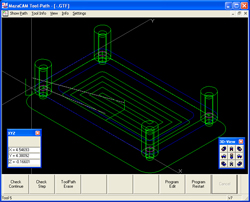
MazaCAM Tool Path Check


As a Mazak user I am sure you’ve experienced the ability to program your Mazaks with the easy to use conversational system, Mazatrol, that is provided in your Nexus, Integrex, Vari-axis or e-Machine. The MazaCAM Editor and Utilities gives you the off-line power you want in Mazatrol.


Perhaps you wanted to the ability to show the toolpath within the MazaCAM Editor without having to purchase the full CAD/CAM system.


Introducing the latest advancement to the MazaCAM Editor; you can now do the tool-path check. Tool-Path Check shows you tool motion and it also goes much further than what you would see on the Mazak — it allows you to do the following:


  • Rotating Views
  • Select Different Views Including 3D-Isometric
  • Info on Objects
  • Distance Verification of Geometry
  • Show Tool Motion
  • List out the Tools
  • etc…


Furthermore, MazaCAM enables you to edit the user-parameters etc. in the TPC ("Tool-Path Control") page like the Mazak. This page contains user-parameters that affect the individual cut, and also add approach and escape movements to avoid hitting the part with the tool or holder.

The MazaCAM Editor and Utilities inherently gives you even more abilities such as:


  • Convert Between Controls
  • Print Mazatrol Programs
  • Compare Mazatrol Files
  • Communications
  • File Management


For more information about MazaCAM, please call SolutionWare Corporation at 408.249.1529 or toll-free at 888.322.3226 (within the U.S.), or simply fill out the form on this site to get more info sent to you.